
Understanding Asynchronous JavaScript
 remove_red_eye
162 Views
remove_red_eye
162 Views
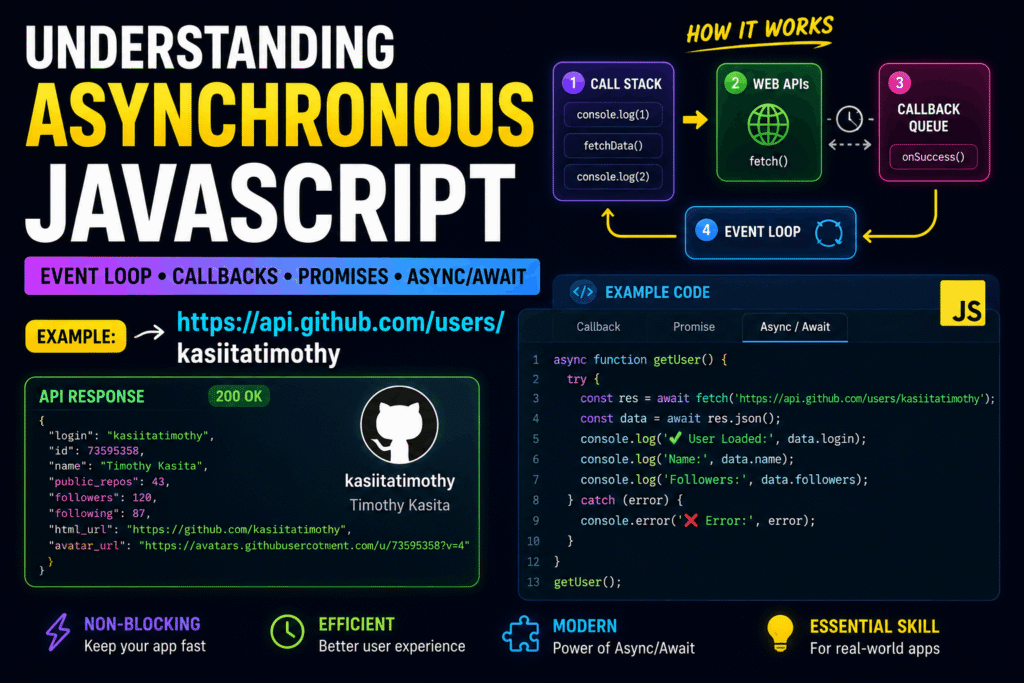
As a senior web development educator, I often see students struggle with managing asynchronous operations. Today, we will master Asynchronous JavaScript using Async/Await. This approach allows you to write asynchronous code that looks and behaves like synchronous code, making it cleaner and easier to maintain.
Understanding Asynchronous JavaScript
JavaScript is single-threaded, meaning it executes one line of code at a time. However, operations like fetching data from an API take time. To prevent these operations from freezing the user interface, we use asynchronous programming.
Historically, this was handled with callbacks and Promises. Today, we use the cleaner syntax of keywords: “async” and “await”.
The Fetch API
The Fetch API is a built-in browser interface used to make HTTP requests. It returns a Promise that resolves to the Response object representing the response to your request.
Here is how you make a basic request:
fetch(‘https://api.github.com/users/kasiitatimothy’)
.then(response => response.json())
.then(data => console.log(data));
While this works, chaining multiple “.then()” methods can quickly become difficult to read. This is where Async/Await shines.
Implementing Async/Await
To use await, you must wrap your code inside a function declared with the “async” keyword. The “await” keyword pauses the execution of the async function until the Promise resolves, returning the result.
Here is the previous Fetch request refactored with Async/Await:
async function getUserData() {
const response = await fetch(‘https://api.github.com/users/kasiitatimothy’);
const data = await response.json();
console.log(data);
}
getUserData();
By using “await”, we eliminate the nested callbacks, creating a linear and highly readable top-to-bottom flow.
Handling Errors Gracefully
When working with network requests, errors are inevitable (e.g., poor connection, invalid URLs). To handle errors in an async function, we wrap our code in a “try…catch” block.
Additionally, Fetch only rejects a promise on network failures. It does not reject on HTTP error status codes like 404 or 500. We must check the “ok” property of the response manually.
async function safeGetUserData() {
try {
const response = await fetch(‘https://api.github.com/users/kasiitatimothy’);
if (!response.ok) {
throw new Error(‘User not found or server error’);
}
const data = await response.json();
console.log(data);
} catch (error) {
console.error(‘Error fetching data:’, error.message);
}
}
safeGetUserData();
Using this structure ensures your application degrades gracefully and provides helpful feedback to users when things go wrong.
Advertisement
Recent Posts
- Mastering Time: A Practical Guide to Building a Digital Clock with JavaScript
- How to Easily Add Live Crypto Prices to Your Website
- CSS grid vs flexbox solved: how to choose the right layout system
- How to create sticky headers and footers that work on all screens
- How to build responsive layouts using flexbox step by step